Stop telling your customers you're on time. Show them.
You service assets you don't own, for customers who aren't in the room when the work happens. AssetOS timestamps every job on site, measures it against the contract, and lets your customer see the same number you do.
Free trial. No credit card. Managed services is on Professional and above. Customer logins are free on every plan.
Your customer's only evidence you showed up is your word.
And your competitor's pitch is the same word, in a different font.
When something gets missed, there's no record. When everything goes right, there's no proof. Either way, you're negotiating the renewal on trust instead of data.
The spreadsheet you keep per customer doesn't fix this. It's still your spreadsheet.
Three things your competitor can't say.
Every asset you service for a customer sits under that customer in your workspace. Every job against it is timestamped on site and measured against the SLA in the contract. What you do with that record is the difference.
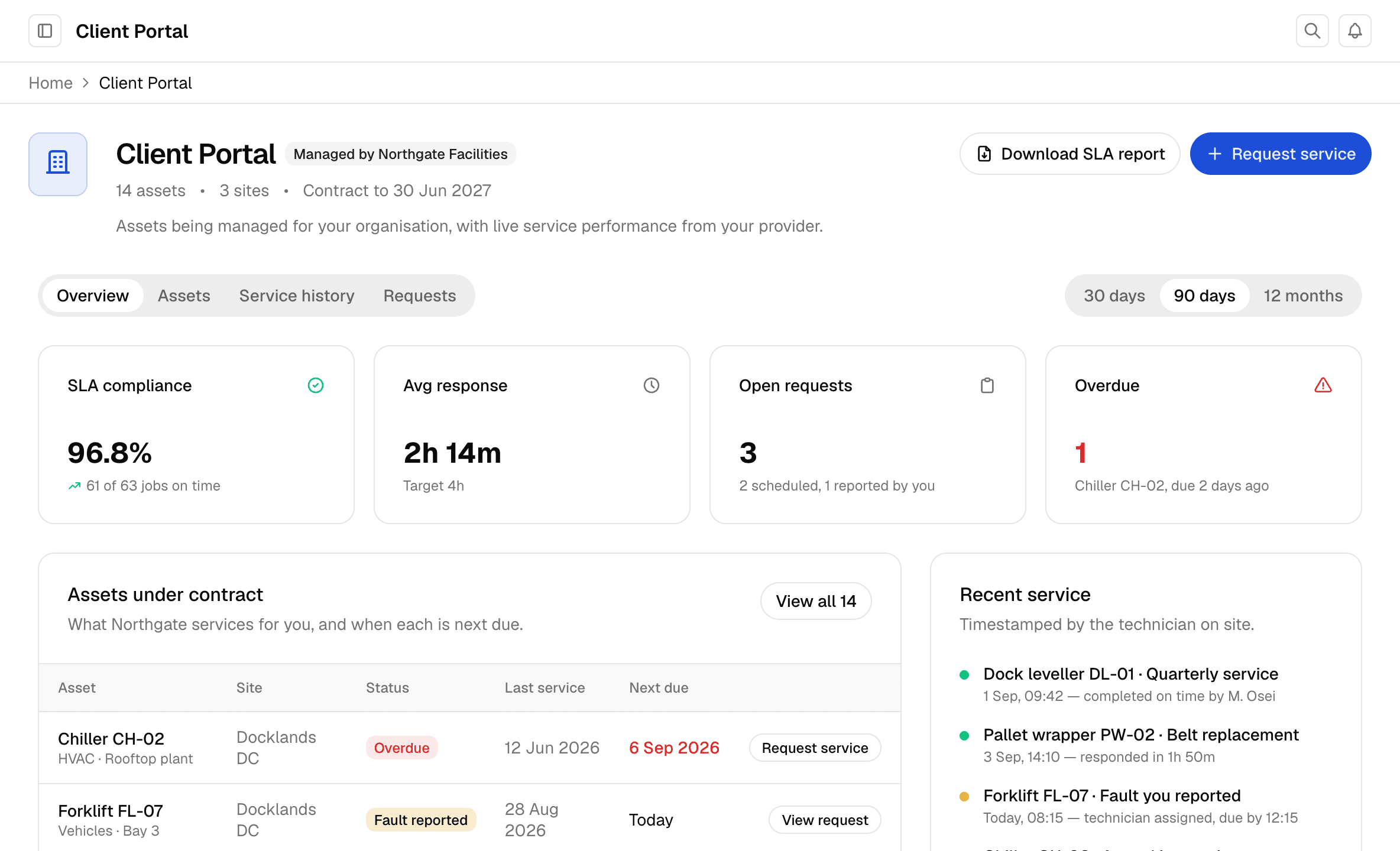
Your customer can see it themselves.
Every job you do is timestamped on site and measured against the SLA in the contract. Your customer logs in and sees the same number you do.
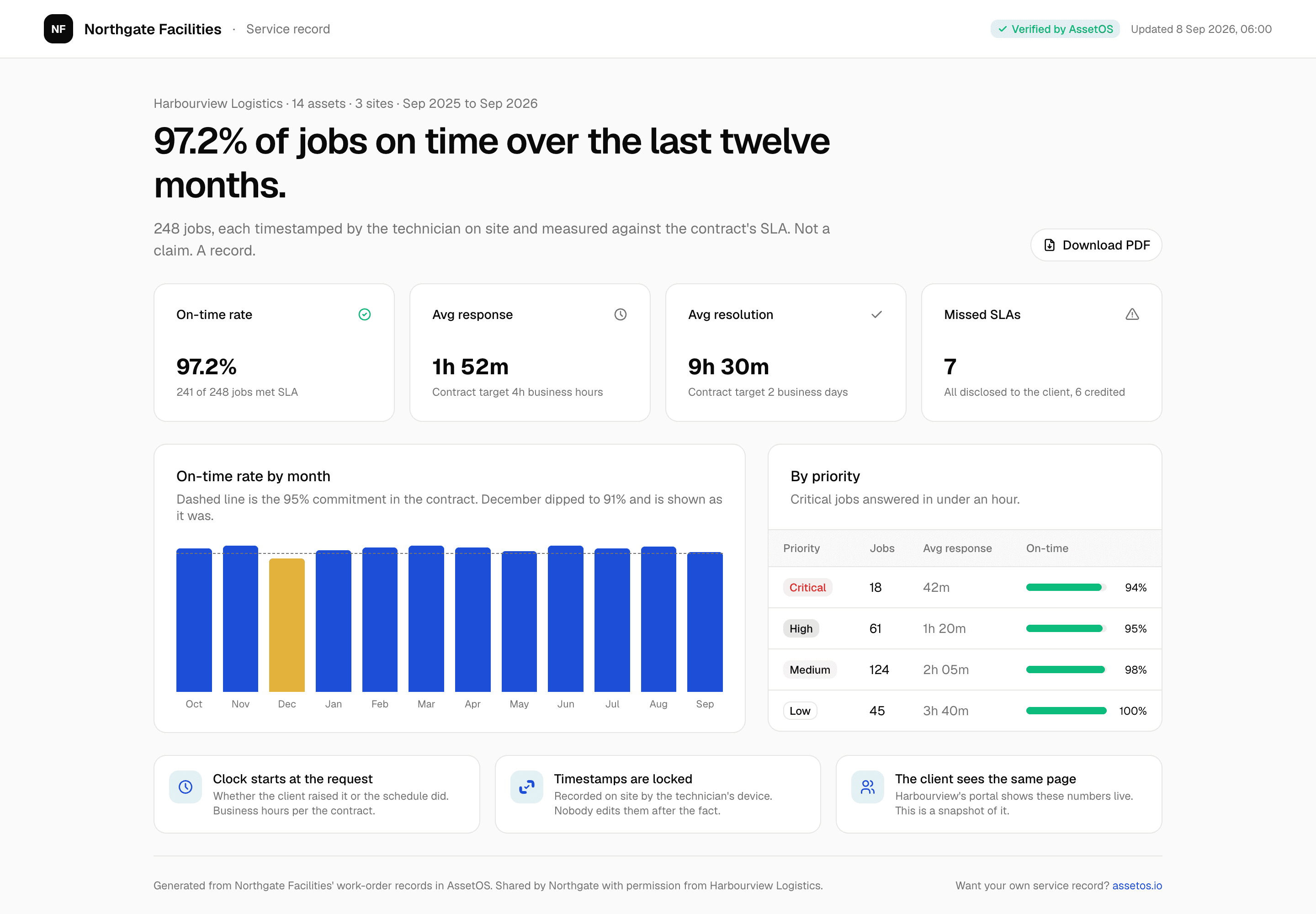
The record goes with you into the renewal.
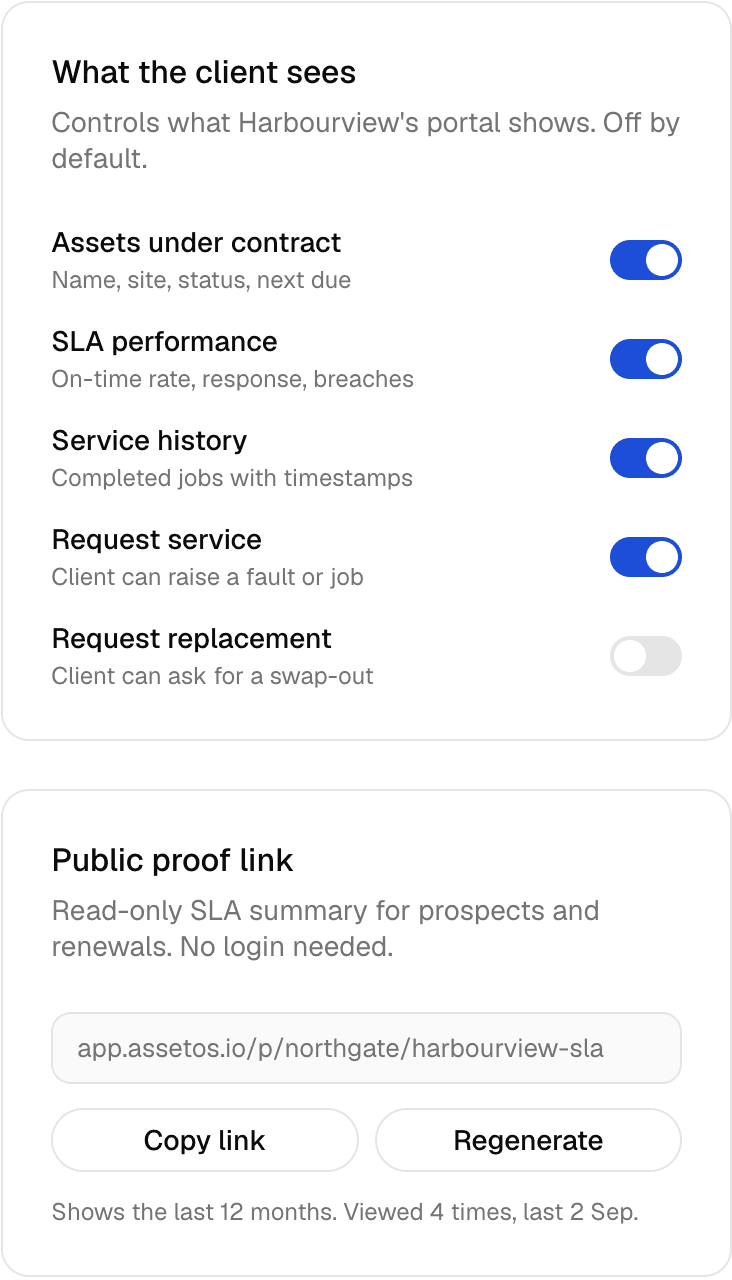
One link. Twelve months. On-time rate, response time, every missed deadline shown as it was. Send it to a prospect before the first call.
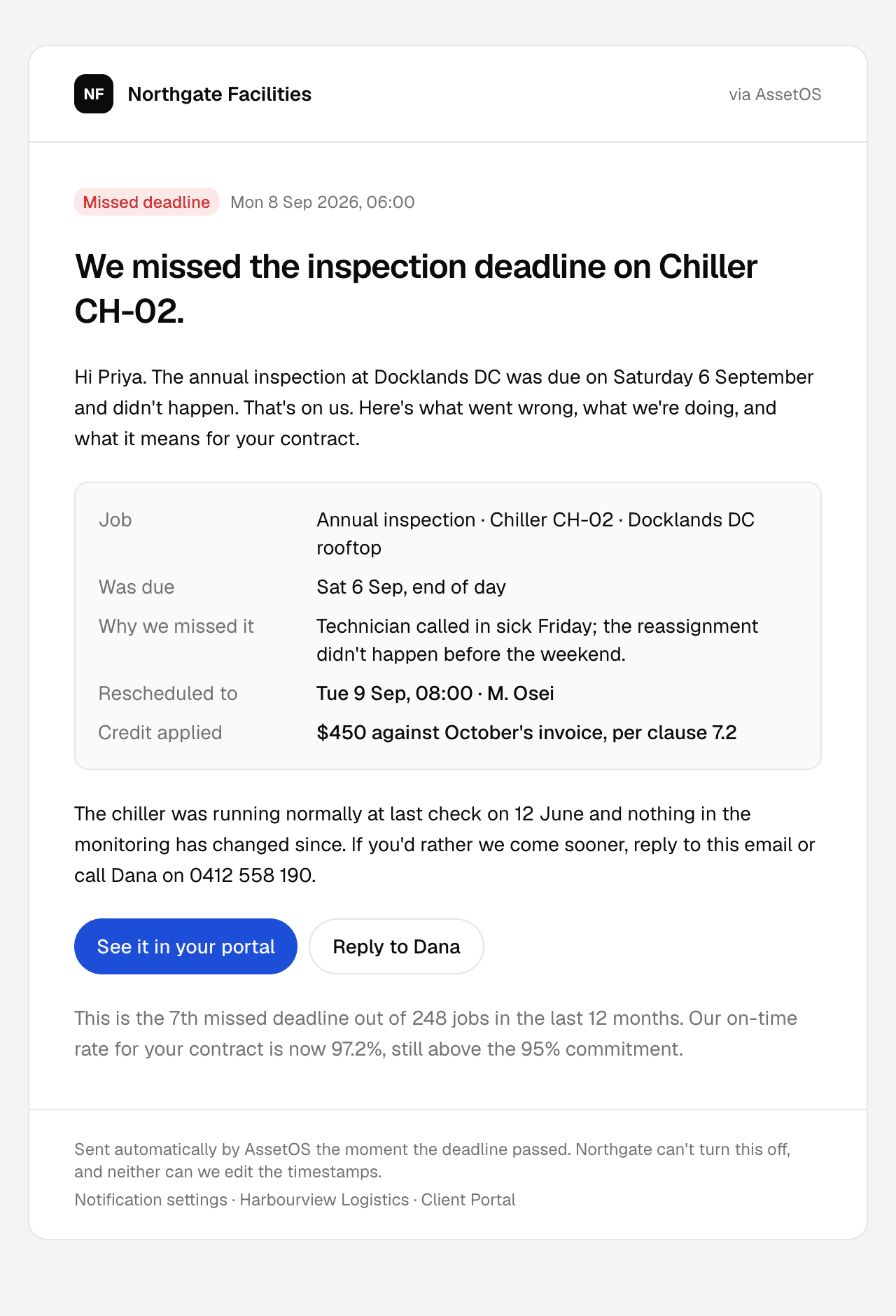
Honest beats green.
When you miss a deadline your customer hears it from AssetOS before they hear it from anyone else: what happened, when you'll be there, what it cost you. Providers who show their misses get renewed. Providers who hide them get replaced.
Built for how your business actually works.
Assets you don't own, still fully tracked.
Each customer's assets sit under their contract in your workspace, with start and end dates attached. They stay yours: they count against your plan, not theirs, on any plan, ever.
Their staff scan a tag and report a fault.
No app, no account. Pick the problem, add a photo. It lands in your Fault Reports queue, and when you promote it to a work order the SLA clock starts.
Your customer gets a free login.
They see the assets you manage for them, your on-time record, and what's next. You pay for your technicians and planners. Nobody pays for the customer.
The dashboard is your sales deck.
On-time rate, average response, missed deadlines, per customer, any period. The numbers a prospect asks for when checking references, shown instead of promised.
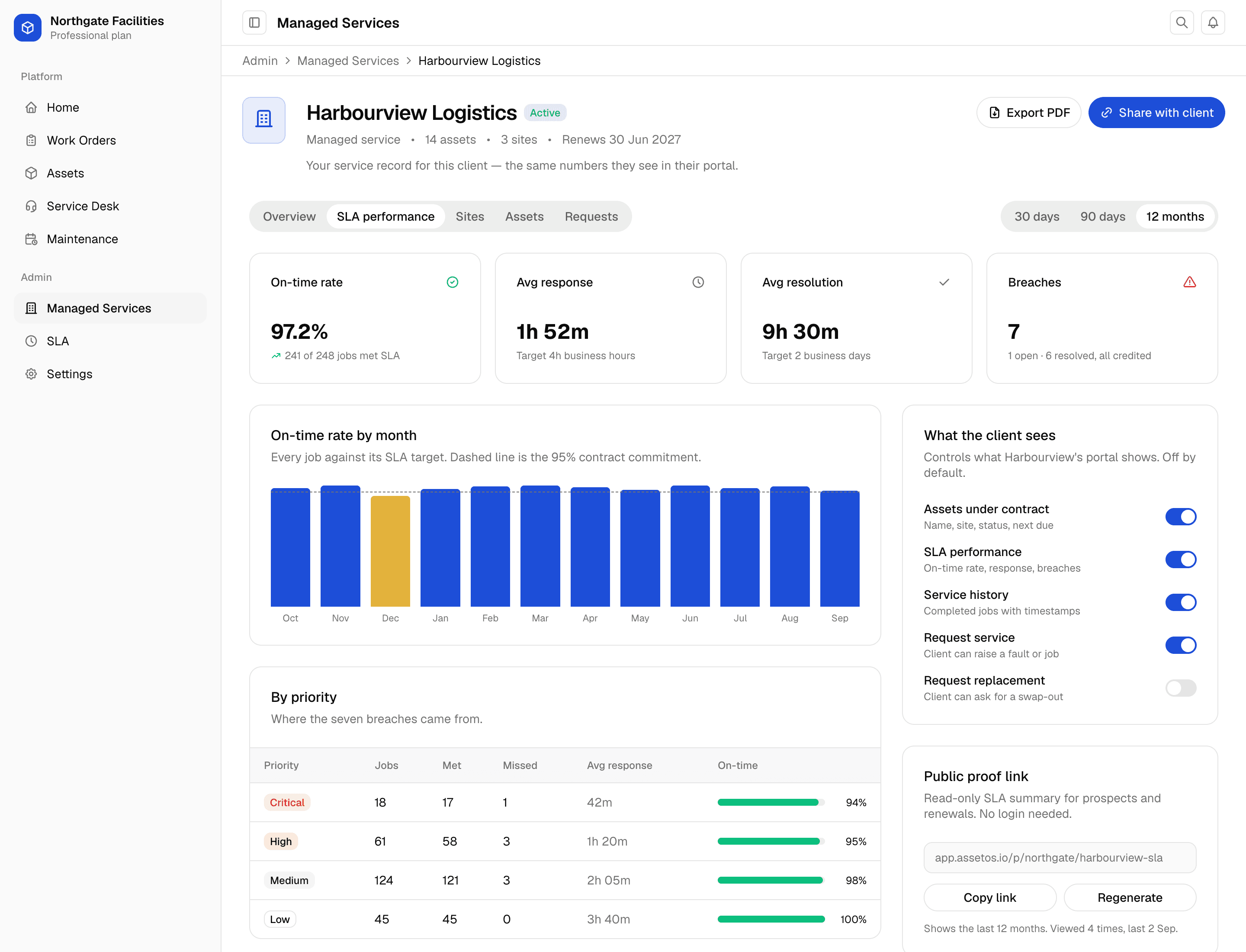
You choose what each customer sees.
Their assets, your SLA performance, service history and fault reporting start switched on; replacement requests start off. Change any of them per customer from their page. They only ever see their own assets, never another customer's.
- Free for the customer on every plan
- Only their assets, never another customer's
- Invite by email; the record exists whether or not they accept
- Public link shows the last 12 months, and how many times it was viewed
Send your customer what they get with their free account.
The vans that get you to site live in the same account.
Check a van out to a technician and the mileage and fuel are recorded at both ends. They do the pre-start on their phone by scanning the QR code on the van, and a failed item raises a repair work order. On-board stock shows what's in each van and which spares are below minimum, so you know whether the part is on board before the technician sets off. When a speeding fine turns up, you can see who had the van that day.
- Your vans and your customers' equipment in one account
- Customers only ever see their own equipment, never your vans
- Check-out and check-in with mileage and fuel
- Stock on board each van, with low spares flagged
More on the vehicle side: AssetOS for fleet maintenance.
“We use AssetOS. Here's our on-time record for the last twelve months. Not a claim, a page.”
Your competitor can't say it back unless they're running the same system. It's not a feature. It's the reason you win the next renewal.
Running against your own contracts in an afternoon.
Three steps per customer. The first one takes about ten minutes. The others depend on how many assets they have.
Add the customer
Name, contact, contract dates. That's the relationship. Their assets and sites hang off it.
Import what you service for them
CSV of the assets under contract, or scan them in on site. Each one is tagged as theirs, managed by you.
Set the SLA, send the invite
Response and resolution targets by asset type, with overrides for individual assets. Send the invite. They get a free login to the assets you manage for them; nothing counts against their plan.
Switching from another CMMS or a pile of spreadsheets? We'll do the migration for you.
Before you ask.
Do my customers have to pay for AssetOS?
No. The assets under your contract live in your workspace and count against your plan, not theirs. Your customer gets a free login. If they want to track their own equipment as well, that sits on their own free allowance.
What can my customer see?
Only what's under your contract with them, and only what you switch on: their assets, your on-time record, the service history, and a way to report a fault. Never another customer's data. Turn each one on or off per customer.
Who gets the missed-deadline email?
The people your customer chooses. When a deadline passes, AssetOS emails the contacts they've added: what happened, the new date, and any credit. If they haven't added anyone, nobody is emailed, but the miss stays on the record either way. That's what makes the on-time number worth showing.
What if my customer never logs in?
Nothing changes for you. Every job is still timestamped against the SLA whether or not they look. When the renewal comes round, you have the record and the link.
Which plan do I need?
Professional or higher. Managed services, the per-customer SLA tracking, and the customer login all sit on Professional and above. Start with a free trial: set up a customer, import the assets you service for them, and run real work orders before you pay anything. Customer logins stay free whichever plan you're on.
Does it work for engineers in the field?
Yes. Native iOS and Android apps with full offline mode. Engineers see the next job, the asset history, and the SLA clock; photos and sign-off sync back when signal returns.
Plan details and seat pricing are on the pricing page.
Start free. See it running against your own contracts in an afternoon.
Add one customer, import the assets you service for them, run a real job. Decide with the record in front of you, not a slide.